AI Prompt for Professional Headshot: 6 Free ChatGPT Prompts
Published on:
You don’t need a photographer for a LinkedIn photo anymore. Upload a regular selfie to ChatGPT, paste the right AI prompt for professional headshot photos, and you get a clean, studio-style headshot in about a minute.
The catch is your face. Ask ChatGPT for “a professional headshot” and it tends to hand back a smoother, younger, slightly different person. That’s fine for a poster. It’s not fine for a profile your boss and clients will look at. So every prompt here first locks your face, and only then changes the outfit, background and light.
Here’s a quick look at which style suits what:
Style
Use it for
Grey studio, navy suit
LinkedIn, job applications
Blurred office, blazer
Tech and startup profiles
Outdoor, golden hour
Coaches, consultants, real estate
Black & white
Speaker and founder bios
Colored backdrop
Creators, designers, freelancers
Plain white
Resume, company team page
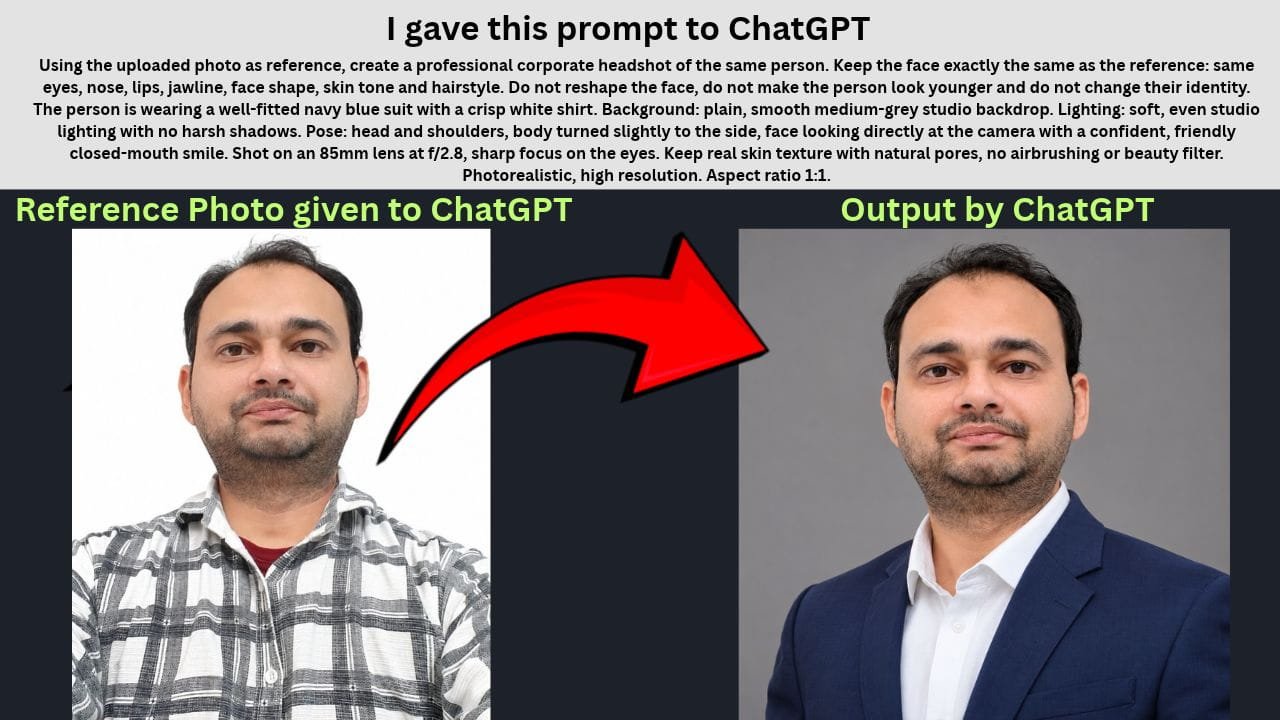
1. Classic Corporate Headshot
If you only make one headshot, make this one. Grey background, dark suit, no surprises. Recruiters see this look every day, and that’s exactly why it works.
Using the uploaded photo as reference, create a professional corporate headshot of the same person. Keep the face exactly the same as the reference: same eyes, nose, lips, jawline, face shape, skin tone and hairstyle. Do not reshape the face, do not make the person look younger and do not change their identity. The person is wearing a well-fitted navy blue suit with a crisp white shirt. Background: plain, smooth medium-grey studio backdrop. Lighting: soft, even studio lighting with no harsh shadows. Pose: head and shoulders, body turned slightly to the side, face looking directly at the camera with a confident, friendly closed-mouth smile. Shot on an 85mm lens at f/2.8, sharp focus on the eyes. Keep real skin texture with natural pores, no airbrushing or beauty filter. Photorealistic, high resolution. Aspect ratio 1:1.
Tip: Don’t like navy? Change “navy blue suit” to charcoal or black. Leave the grey background as it is, since it suits almost every skin tone.
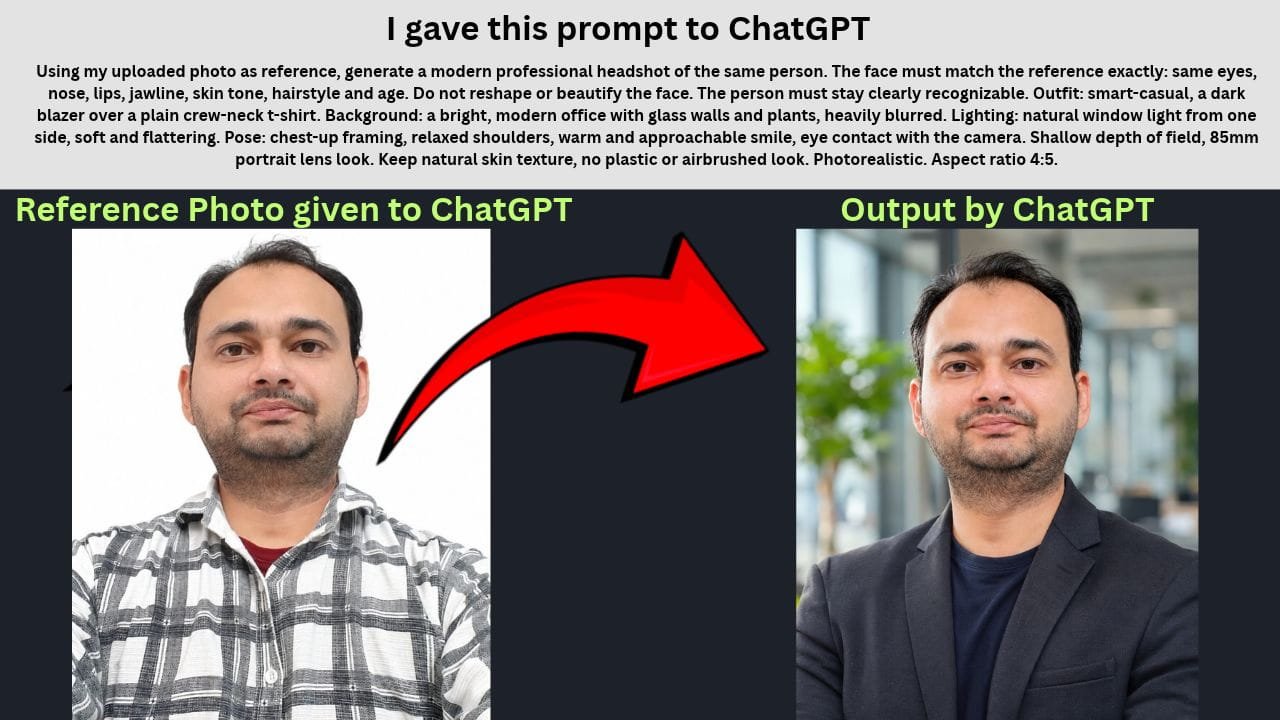
2. Modern Startup / Tech Look
A full suit can look out of place if you work at a startup. A blazer over a plain t-shirt with a blurred office behind you looks professional without trying too hard.
Using my uploaded photo as reference, generate a modern professional headshot of the same person. The face must match the reference exactly: same eyes, nose, lips, jawline, skin tone, hairstyle and age. Do not reshape or beautify the face. The person must stay clearly recognizable. Outfit: smart-casual, a dark blazer over a plain crew-neck t-shirt. Background: a bright, modern office with glass walls and plants, heavily blurred. Lighting: natural window light from one side, soft and flattering. Pose: chest-up framing, relaxed shoulders, warm and approachable smile, eye contact with the camera. Shallow depth of field, 85mm portrait lens look. Keep natural skin texture, no plastic or airbrushed look. Photorealistic. Aspect ratio 4:5.
Tip: This one works well even if your reference photo is a casual selfie, because the outfit isn’t changing much.
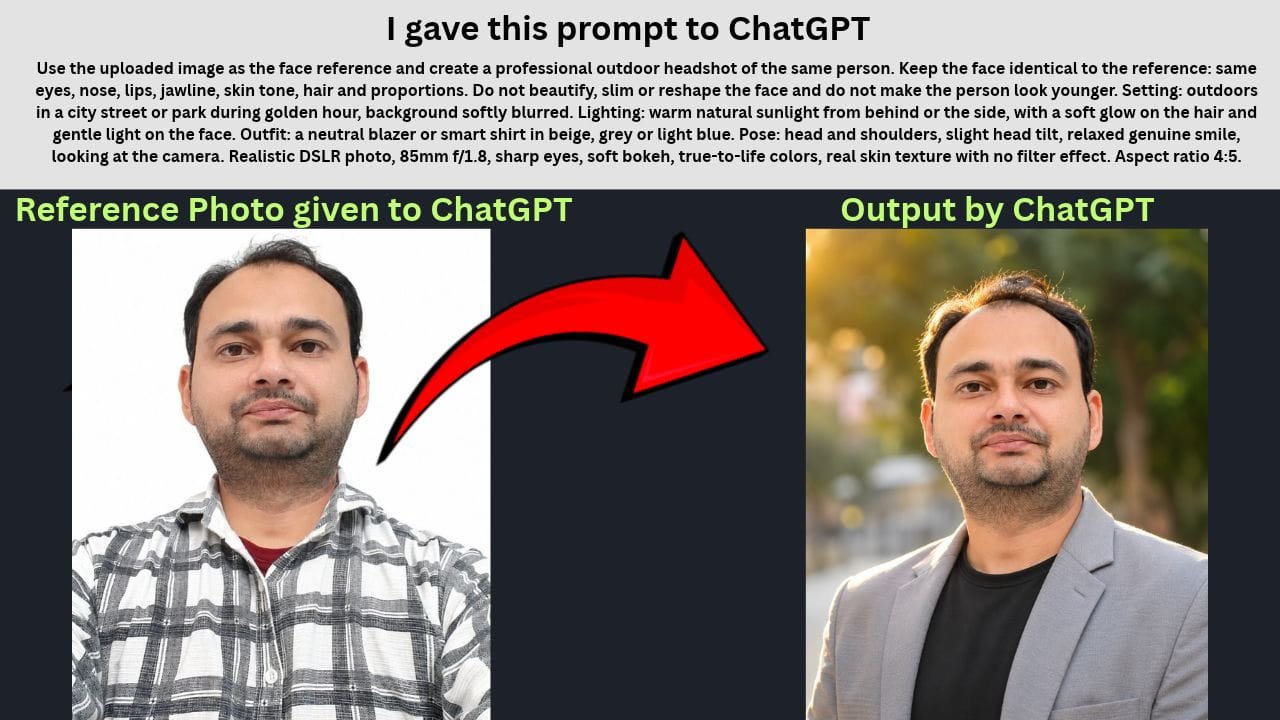
3. Outdoor Natural Light Headshot
Studio photos can feel stiff. Soft evening sunlight and a blurred street behind you make you look friendly, which matters a lot if clients meet you before they hire you.
Use the uploaded image as the face reference and create a professional outdoor headshot of the same person. Keep the face identical to the reference: same eyes, nose, lips, jawline, skin tone, hair and proportions. Do not beautify, slim or reshape the face and do not make the person look younger. Setting: outdoors in a city street or park during golden hour, background softly blurred. Lighting: warm natural sunlight from behind or the side, with a soft glow on the hair and gentle light on the face. Outfit: a neutral blazer or smart shirt in beige, grey or light blue. Pose: head and shoulders, slight head tilt, relaxed genuine smile, looking at the camera. Realistic DSLR photo, 85mm f/1.8, sharp eyes, soft bokeh, true-to-life colors, real skin texture with no filter effect. Aspect ratio 4:5.
Tip: If golden hour makes your skin look too orange, replace “golden hour” with “soft overcast daylight”.
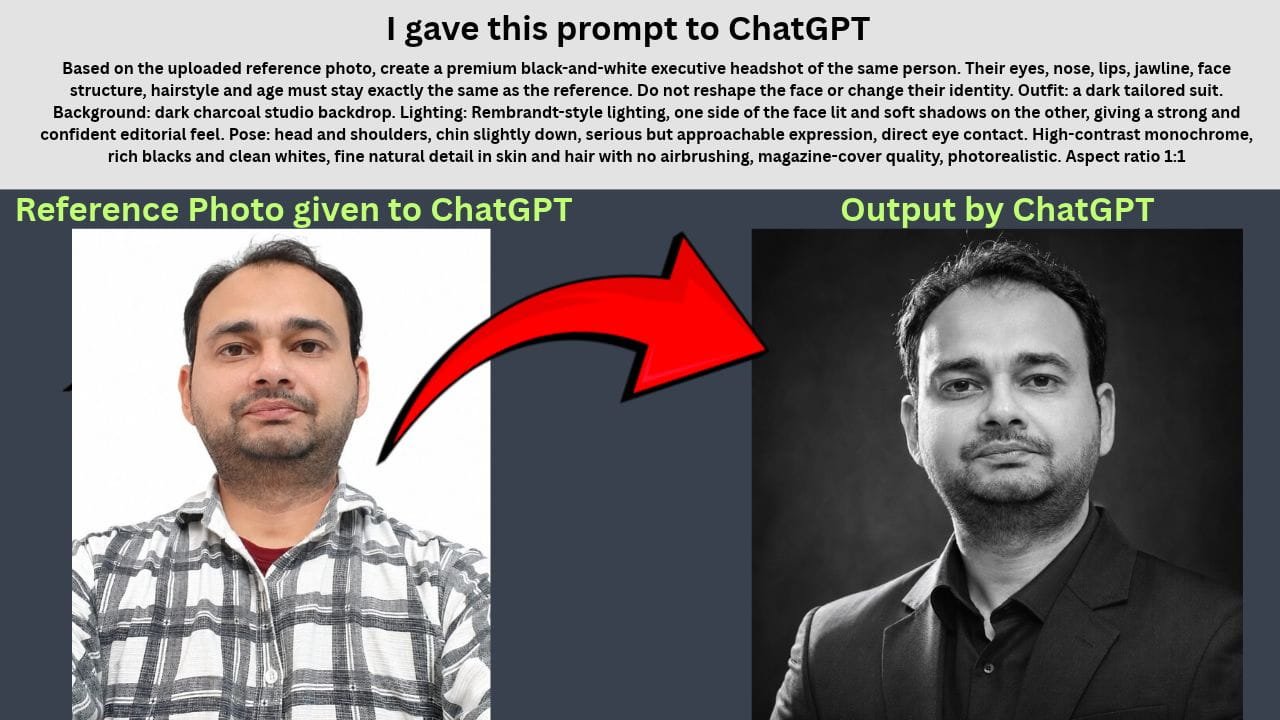
4. Black & White Executive Portrait
This is the kind of photo you see next to a speaker’s name on an event poster. Heavy shadows on one side give it a serious, senior feel.
Based on the uploaded reference photo, create a premium black-and-white executive headshot of the same person. Their eyes, nose, lips, jawline, face structure, hairstyle and age must stay exactly the same as the reference. Do not reshape the face or change their identity. Outfit: a dark tailored suit. Background: dark charcoal studio backdrop. Lighting: Rembrandt-style lighting, one side of the face lit and soft shadows on the other, giving a strong and confident editorial feel. Pose: head and shoulders, chin slightly down, serious but approachable expression, direct eye contact. High-contrast monochrome, rich blacks and clean whites, fine natural detail in skin and hair with no airbrushing, magazine-cover quality, photorealistic. Aspect ratio 1:1.
Tip: Upload a sharp, well-lit photo for this one. A dark or blurry selfie loses a lot of detail once the color is gone.
5. Creative Professional Headshot
Designers and creators can get away with more color. A solid backdrop in a bold shade makes your photo stand out in a feed full of grey corporate pictures.
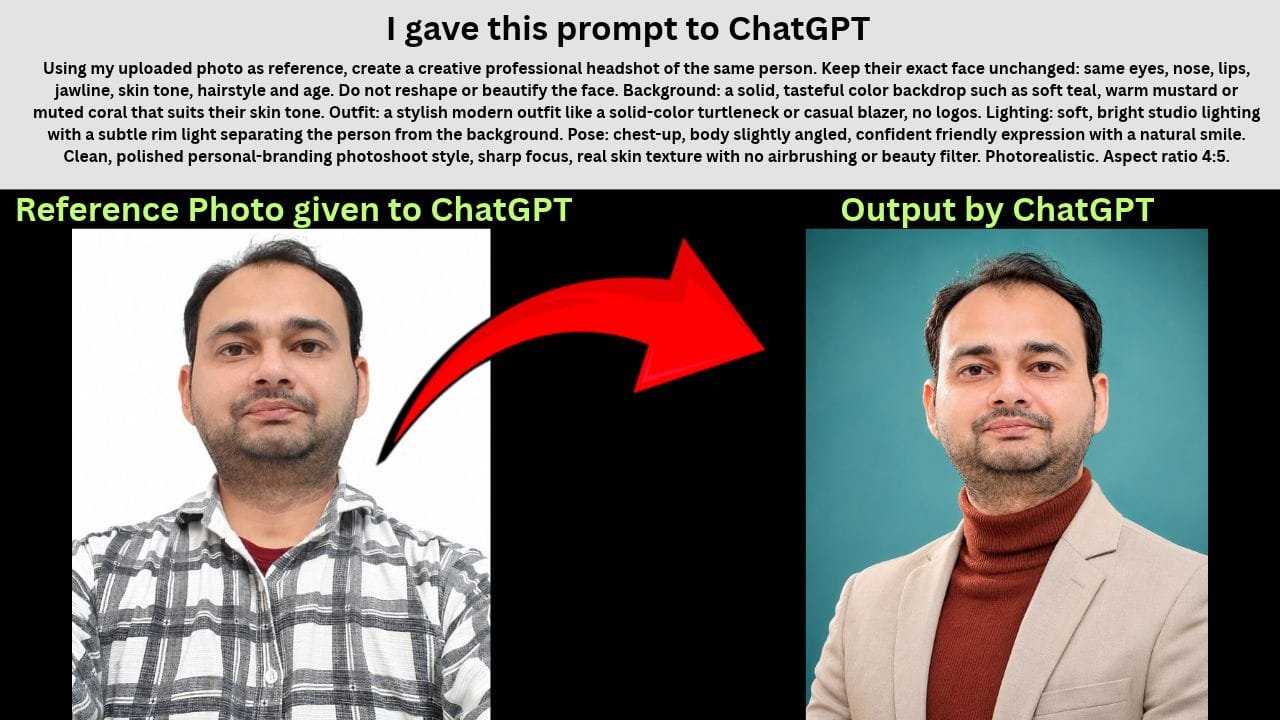
Using my uploaded photo as reference, create a creative professional headshot of the same person. Keep their exact face unchanged: same eyes, nose, lips, jawline, skin tone, hairstyle and age. Do not reshape or beautify the face. Background: a solid, tasteful color backdrop such as soft teal, warm mustard or muted coral that suits their skin tone. Outfit: a stylish modern outfit like a solid-color turtleneck or casual blazer, no logos. Lighting: soft, bright studio lighting with a subtle rim light separating the person from the background. Pose: chest-up, body slightly angled, confident friendly expression with a natural smile. Clean, polished personal-branding photoshoot style, sharp focus, real skin texture with no airbrushing or beauty filter. Photorealistic. Aspect ratio 4:5.
Tip: Pick one backdrop color instead of leaving it to ChatGPT, and keep your outfit in a different shade so you don’t blend into the background.
6. Clean White Background Headshot
Resumes and company team pages usually need something plain. This prompt keeps it simple: white background, formal clothes, face straight to the camera.
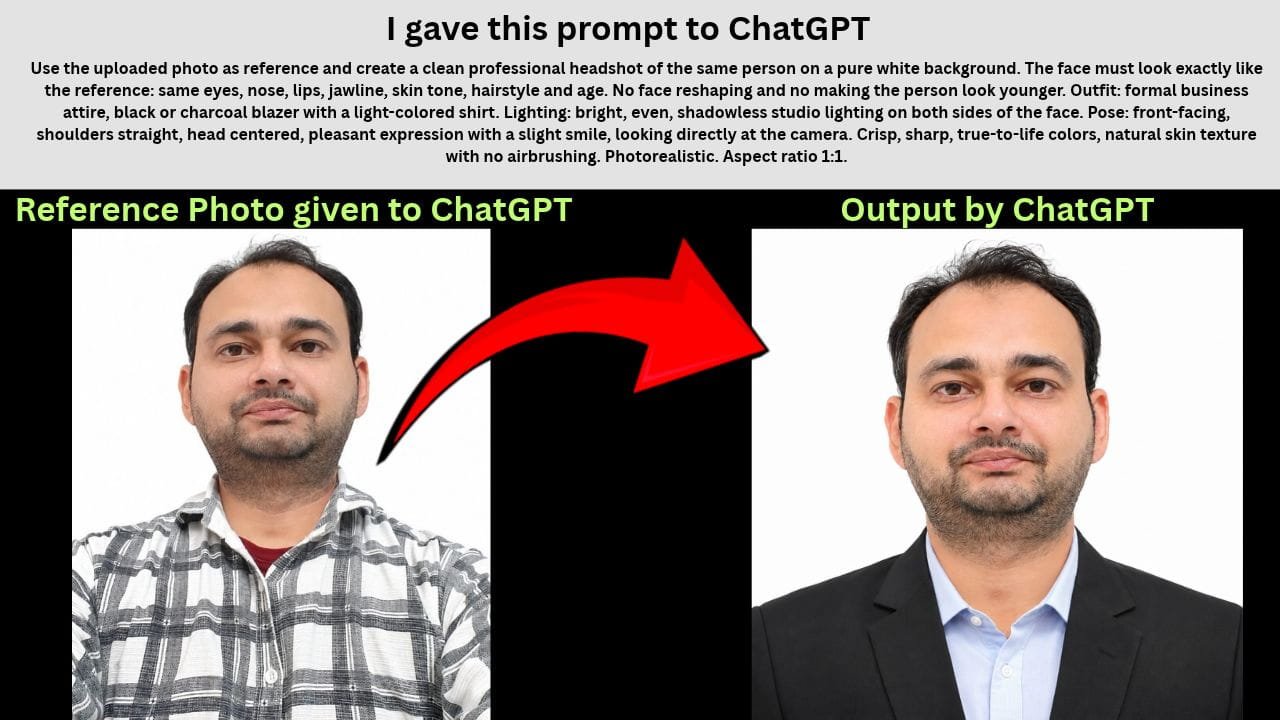
Use the uploaded photo as reference and create a clean professional headshot of the same person on a pure white background. The face must look exactly like the reference: same eyes, nose, lips, jawline, skin tone, hairstyle and age. No face reshaping and no making the person look younger. Outfit: formal business attire, black or charcoal blazer with a light-colored shirt. Lighting: bright, even, shadowless studio lighting on both sides of the face. Pose: front-facing, shoulders straight, head centered, pleasant expression with a slight smile, looking directly at the camera. Crisp, sharp, true-to-life colors, natural skin texture with no airbrushing. Photorealistic. Aspect ratio 1:1.
Tip: If a white shirt disappears into the white background, change “pure white background” to “very light grey background”.
How to Use an AI Prompt for a Professional Headshot
Open ChatGPT in the app or at chatgpt.com.
Tap the + icon and upload your photo.
Copy a prompt from above, paste it and send.
Want a small change, like another suit color? Ask in the same chat instead of starting a new one.
Which photo should you upload? Use a recent photo where you’re facing the camera in good light. Sunglasses, caps, filters and group photos confuse the AI. A selfie taken next to a window is usually enough.
Which size should you pick? Use 1:1 for LinkedIn and most profile pictures, and 4:5 for portfolios and Instagram. You can change the aspect ratio at the end of any prompt.
FAQs
Is it free to make headshots in ChatGPT?
Yes, free accounts can generate images too, but there’s a daily limit. If you hit it, you’ll have to wait or upgrade to Plus.
Can I use an AI headshot on LinkedIn?
Yes, as long as it actually looks like you. If someone meets you on a video call and can’t match your face with your profile photo, it hurts more than it helps.
Do these prompts work in Gemini?
Yes. Every AI prompt for professional headshot photos on this page works in Google Gemini too. Upload your photo there and paste the same prompt. The lighting and colors may come out a bit different from ChatGPT.
Will ChatGPT use my photo for training?
It can, unless you turn it off. Go to Settings > Data Controls and switch off “Improve the model for everyone.”
Join Our Telegram Group
Join Our WhatsApp Group
Nazim Khan — Founder & Editor, TechGuruPlus.com
[MBA in Finance]
Nazim Khan has spent over ten years working with Excel, Tally and office documentation in accounts, finance and MIS roles. He has been running TechGuruPlus.com since 2016, where he publishes free editable templates for office work, and the YouTube channel Business Excel. He has trained more than 50,000 people online. Every template on this site is built and checked by him before it is published.