
Speed is a competitive advantage. According to industry benchmarks, a typical app development cycle can take months, sometimes 6-12 months, for full features.
But what if you could compress that to a single day? That’s exactly what the “build your app in 24 hours” thinking aims for. In this post, we’ll break down the approach, what’s realistic, how to do it, and where the risks lie. We’ll also show how working with a mobile app development company like 247Coders.AI helps you move fast while staying realistic.
Here’s what you’ll walk away with:
- A clear view of the problem most founders face
- A step-by-step day-one framework
- How 247Coders.AI and similar app development companies make it viable
- A sample use case
- A final checklist and next steps

The Problem
Many founders and decision-makers hit the same friction:
- Too slow to market. By the time your app arrives, market conditions change.
- High cost and risk. Hiring full teams or outsourcing to big agencies often means multi-month contracts and steep budgets.
- Scope creep & indecision. Without a tight plan, features expand, timelines slip, and budgets bloat.
- Validation uncertainty. You may invest heavily before knowing if users care.
Yet speed matters. In today’s landscape, a minimally viable product that gets into hands quickly can help you learn, iterate, and pivot long before launching a full-featured version. And when your brand is seen as a nimble “app development company,” that agility becomes a selling point.
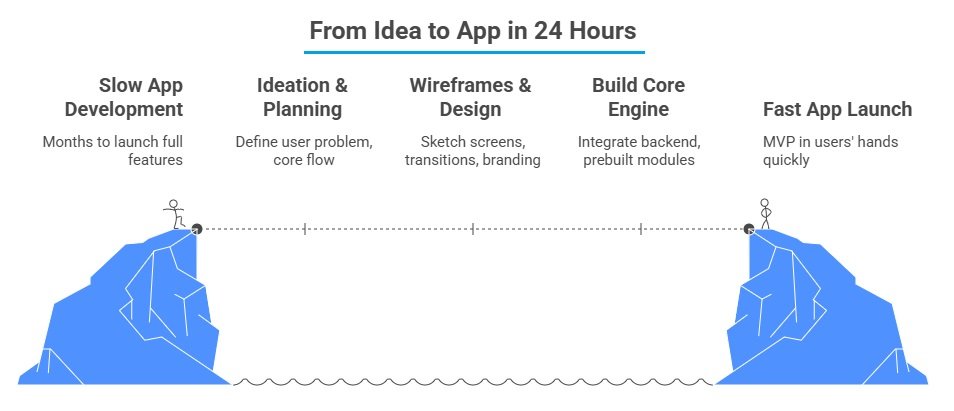
The 24-Hour App Framework
This is not a “full-feature enterprise app in a day” but a laser-focused MVP that proves your core va
| Phase | Time Budget | Goal |
| Hour 0-2 | Ideation & planning | Define one user problem, one core user flow |
| Hour 2-4 | Wireframes & design | Sketch screens, transitions, branding |
| Hour 4-8 | Build core engine | Integrate backend or use prebuilt modules |
| Hour 8-12 | UI polish & flows | Hook design to logic, smooth navigation |
| Hour 12-16 | Testing & fixes | Internal QA, bug fixes, responsive tweaks |
| Hour 16-20 | App Store prep | Screenshots, metadata, compliance |
| Hour 20-24 | Deployment & review | Submit to stores, approve, or plan a rollback |
Key Tactics & Tips
- Use prebuilt modules and APIs for login, push notifications, analytics, etc.
- Limit yourself to 1-2 major screens, avoid complexity like chat, payments, etc., unless central.
- Design in a tool like Figma and reuse assets; don’t make perfect, make usable.
- Automate testing where possible.
- Prepare fallback web or PWAs as plan B if app store approval stalls.
This approach lets you customize your app in 24 hours with constraints and validate core demand rapidly.
Why a Partner Matters
You can’t always DIY this, especially at scale or under the pressure of deadlines. That’s where a mobile app development company or dedicated team comes in. Here’s how 247Coders.AI fits this model:
- Their “App in 24 Hours” offering is built exactly around this kind of compressed build process.
- They combine AI tooling + human developers to streamline building, so tasks like module wiring or boilerplate get accelerated.
- As an app development company, we provide dedicated developers for hire, letting you scale the team as needed.
- Because of their process, you can hire coders from 247Coders.AI on demand rather than committing to full-time employees.
- Their platform includes templates, previews, and cross-OS deployment you don’t waste time redoing for iOS and Android separately.
- Their pricing is more predictable, helping you judge the cost to develop an app in accelerated mode.
- Whether you’re a founder or an enterprise CTO, you can hire app developers or hire dedicated developers to bring your project from concept to completion fast.
Working with them gives you speed and safety; you’re not gambling purely on internal teams; you bring in specialist execution.
Use Case: “Local Events” App in 24 Hours
Imagine a founder wants to test a simple idea: an app that lists local weekend events and lets users bookmark favorites.
- Hour 0-2: We define one core user story: “list events in my city → tap to bookmark → view bookmarked page.”
- Hour 2-4: UI layout: a home feed, a bookmark page. Branding with quick colors.
- Hour 4-8: Use a prebuilt event-API + user account flow.
- Hour 8-12: Wire up UI to API, bookmark logic, and caching.
- Hour 12-16: Run through 10 sample flows, fix crashes, polish.
- Hour 16-20: Prepare screenshots and metadata.
- Hour 20-24: Submit to App Store / Play Store; if approval is delayed, launch web version or internal test.
At the end, the founder gets feedback from real users within hours, not months. If demand is strong, they can ramp up features as a second version.
That’s exactly the kind of idea we at 247Coders.AI help founders launch fast, test real user interest, and then build forward.
Things to Watch Out For
- Scope creep kills you. Discipline to stick to core functionality is critical.
- App Store review delays. Even simple apps may require 1-3 days of approval, so have a fallback.
- Quality vs speed tradeoff. This build is for learning, not a final polished product.
- Security & scalability. If your MVP succeeds, refactor for production-level architecture.
- Platform limits. Some features can’t be shoehorned into 24-hour builds.
Launching an app in 24 hours is not about building everything; it’s about building what matters fastest. It forces clarity, cuts waste, and lets you validate or pivot quickly. When executed right, it turns ideas into real experiments.
If you’re leaning into this challenge and want an experienced partner who knows how to build your app in 24 hours with 247Coders.AI, we’d love to help. Schedule a consultation or talk to our product strategists so you can turn your idea into an app fast and smart.
 Join Our WhatsApp Group


Nazim Khan (Author) 📞 +91 9536250020
[MBA in Finance]
Nazim Khan is an expert in Microsoft Excel. He teaches people how to use it better. He has been doing this for more than ten years. He is running this website (TechGuruPlus.com) and a YouTube channel called "Business Excel" since 2016. He shares useful tips from his own experiences to help others improve their Excel skills and careers.


