Here i want to explain to you with an example of how can you pick up the Second and Third values in Excel by Vlookup.
Below is my Excel data and i want to pick up the 2nd matched value and the 3rd matched value of Salesman “JOHN” with the help of vlookup formula, then how can i pick both values with it?
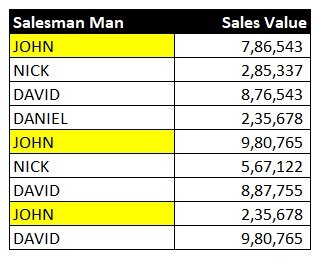
Here i want the answer like this:-
2nd Match Value:
John : 9,80,765
3rd Match Value:
John : 2,35,678
Actually, in Excel, the VLOOKUP function is designed to return the first matching value it finds. If you want to retrieve the second value associated with “JOHN,” you may need to use a different approach. One way to achieve this is by using a combination of functions like INDEX, MATCH, and SMALL.
Assuming your data is in columns A and B (A contains the Salesman Name, and B contains the Sales values), you can use the following formula to get the second value associated with “JOHN“:
Pick up the 2nd matched value in Excel
Formula
=INDEX($B$1:$B$10, SMALL(IF($A$1:$A$10="JOHN", ROW($A$1:$A$10)-MIN(ROW($A$1:$A$10))+1, ""),2))
This is an array formula, so you’ll need to enter it using Ctrl + Shift + Enter.
Output
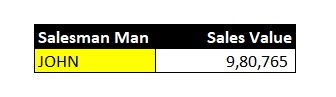
Let me break down the formula:
IF($A$1:$A$10="JOHN", ROW($A$1:$A$10)-MIN(ROW($A$1:$A$10))+1, ""): This part of the formula creates an array that contains the row numbers where “JOHN” is found and blanks elsewhere.SMALL(..., 2): This part returns the second smallest value from the array.INDEX($B$1:$B$10, ...): This part uses the row number obtained from the SMALL function to index into the values in column B.- So, the entire formula will return the second value associated with “JOHN” in your data. Adjust the cell references accordingly based on your actual data range.
Pick up the 3rd matched value in Excel
Formula
=INDEX($B$1:$B$10, SMALL(IF($A$1:$A$10="JOHN", ROW($A$1:$A$10)-MIN(ROW($A$1:$A$10))+1, ""),3))
This is an array formula, so you’ll need to enter it using Ctrl + Shift + Enter.
Output

So, the entire formula will return the third value associated with “JOHN” in your data. Adjust the cell references accordingly based on your actual data range.
FAQ
- How to find the first, 2nd or nth match value in Excel?
- How to pick 2nd value in vlookup
Join Our Telegram Group

Join Our WhatsApp Group


HELLO