Make Monthly Stock Sheet in Excel – (Opening Stock + Purchase – Sale = Closing Stock)

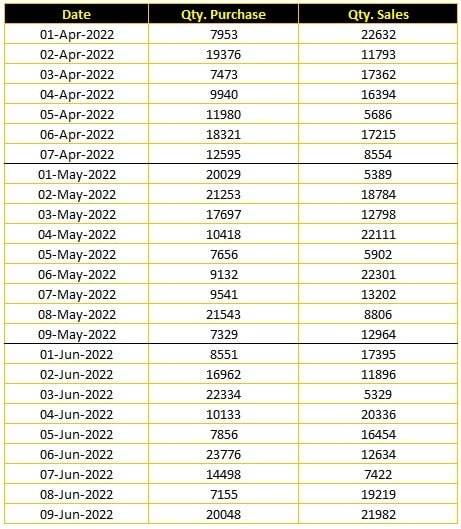
Monthly Raw Data of Quantity – Purchase & Sales with date-wise 

Purchase Sale Input Data with date wise

Formula: =SUMIFS(C:C,B:B,”>=”&G5,B:B,”<=”&EOMONTH(G5,0))

After Formula Applied – Monthly Stock Summery with Opening & Closing Balance

Monthly Stock Summery with Opening & Closing Balance

Video Tutorial

Download Stock Sheet with Formula (Download.xlsx)

Download Excel File

Download more Excel Project Files

Join Our Telegram Group

Join the TechGuruPlus Telegram group

Join Our WhatsApp Group

Join the TechGuruPlus WhatsApp group
Nazim Khan, founder of TechGuruPlus.com

Founder & Editor, TechGuruPlus.com
[MBA in Finance]

Nazim Khan has spent over ten years working with Excel, Tally and office documentation in accounts, finance and MIS roles. He has been running TechGuruPlus.com since 2016, where he publishes free editable templates for office work, and the YouTube channel Business Excel. He has trained more than 50,000 people online. Every template on this site is built and checked by him before it is published.
Contact  ·  Excel Course

1 thought on “Make Monthly Stock Sheet in Excel – (Opening Stock + Purchase – Sale = Closing Stock)”

Leave a Comment


