
नमस्कार दोस्तों आज हम एक ऐसे tdl फाइल के बारे में चर्चा करेंगे ,जिसकी मदद से आप अपने Tally Prime में एक Click के साथ Empty Ledger को हटा सकते हैं और साथ ही आप एक ही स्थान पर सभी Empty Ledger देख सकते हैं, तो चलिए देखते हैं कि हम कैसे उपयोग कर सकते हैं इस tdl फ़ाइल का tally prime में ?
TDL Code For Delete Empty Ledger
[#Menu : Gateway of Tally]

Item : Delete Empty Ledgers : Display : EmptyLedgerReport

[Report : EmptyLedgerReport]

Form :EmptyLedgerReport

[Form :EmptyLedgerReport]

Part : EmptyLedgerReport
Button : Select All Button, Delete Ledger
Width : 100 % Page

[Part :EmptyLedgerReport]

Line : EmptyLedgerReport
Repeat : EmptyLedgerReport : EmptyLedgerReportColl
Scroll : Vertical

[Line : EmptyLedgerReport]

Field : Name Field
Right Field : Amount Field
Local : Field : Name Field : Set As : $Name
Local : Field : Amount Field : Set As : $ClosingBalance

[Collection :EmptyLedgerReportColl]

Type : Ledger
Filter : IsaEmptyLedger

;; ----- For Stock Items
; Type : Stockitem
; Filter :IsaEmptyItem
;--------

[System : Formula]

IsaEmptyLedger : $$IsEmpty:$ClosingBalance And $$IsEmpty:$DebitTotals

;; ----- For Stock Items
;IsaEmptyItem : $$IsEmpty:$ClosingBalance And $$IsEmpty:$InwardQuantity
;--------

[Button : Select All Button]

Key : Alt +1
Action : Select All

[Button : Delete Ledger]

Key : Alt + 2
Action : Delete Object
Step 2: अब above code को Save करने के बाद Tally Prime पर TDL File अपलोड करें ( और अगर आपको Tally Prime पर TDL File upload करने का तरीका नहीं पता है तो नीचे दिए गए Link पर Click करें जो आपको Tally Prime पर TDL File अपलोड करने के लिए Guide करेगा )
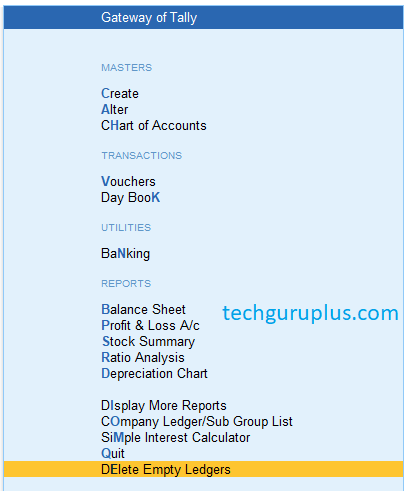
Step 3: Now after load the TDL file into Tally Prime, you can see one extra option in Gateway of Tally as ” Delete Empty Ledger”
as shown below image
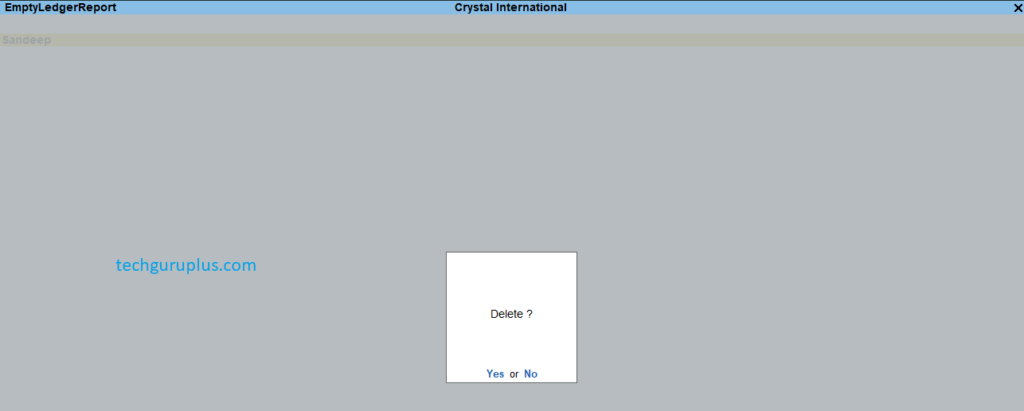
Step 3: Now click on the new option, you can see all your empty ledger are showing, now select one that you want to delete

Step 4: Press ALT+ 2 or directly click on the Delete option on the right-hand side, one dialogue box will open press yes and your empty ledger will be deleted
धन्यवाद दोस्तों! अगर आपको ये आर्टिक्ल पसंद आया हैं तो इसको सोशल मीडिया पर अपने दोस्तो के साथ जरूर से शेयर कीजिए, जिससे उनको भी ये जानकारी प्राप्त हो सके।
Download Button पर Click करके फ़ाइल डाउनलोड करें
 Join Our WhatsApp Group


Nazim Khan (Author) 📞 +91 9536250020
[MBA in Finance]
Nazim Khan is an expert in Microsoft Excel. He teaches people how to use it better. He has been doing this for more than ten years. He is running this website (TechGuruPlus.com) and a YouTube channel called "Business Excel" since 2016. He shares useful tips from his own experiences to help others improve their Excel skills and careers.


delete ledger vapis kaise aayegi ye btao sir