
When I tested Image to Video AI, the most important result was not only the video itself. It was the feeling that the process made AI video less intimidating. That may sound simple, but it matters. Many people are curious about AI video, yet they avoid trying it because the category feels technical, unpredictable, or too professional for their everyday needs.
That hesitation is real. A small business owner may wonder whether they need editing experience. A social creator may worry that the tool will waste time. A personal user may not know what kind of prompt to write. Even when the technology is powerful, users can still feel stuck before the first step.
This platform feels useful because it lowers that first barrier. It does not ask the user to understand video production theory. It asks for an image and a description. That is a friendlier starting point, and in creative work, a friendly starting point can change everything.
Why Confidence Matters In AI Creation
AI tools are often evaluated by output quality alone. Output quality matters, but it is not the only factor. A tool can be technically impressive and still fail ordinary users if it makes them feel uncertain.
Users Need To Know What Happens Next
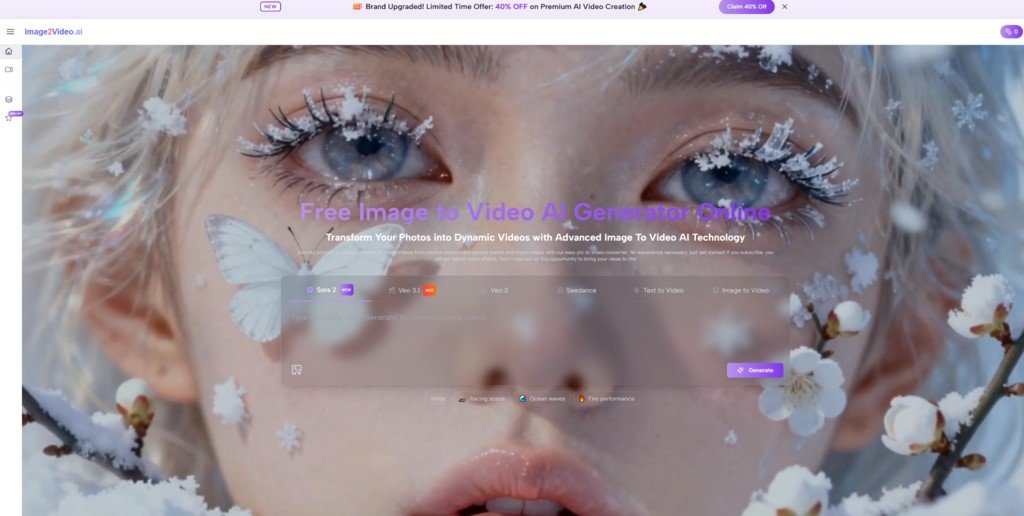
The platform’s public workflow helps because the sequence is clear. You upload an image, write a prompt, allow the system to process, and download the MP4 result.
That clarity gives users a sense of control. They may not control every frame, but they understand the path.
Predictable Steps Make Experimentation Easier
When users know what happens next, they are more willing to experiment. They can focus on the image and the motion idea instead of worrying about hidden settings or confusing menus.
Creative Confidence Starts Before The Output
The most important moment may happen before generation. If a user feels capable of starting, the tool has already solved part of the problem. Many creative tools fail at that point by making the first action unclear.
This platform avoids that trap by keeping the initial workflow direct.
How The Official Workflow Builds Trust
Trust in a tool often comes from repeatable steps. The platform’s process is short, but each step supports user confidence.
Step One Makes The Starting Point Familiar
The user begins with a still image. This is familiar because most people already understand photos, product images, portraits, and visual assets.
The platform supports common image formats such as JPEG and PNG, which helps users avoid unnecessary preparation.
Step Two Turns Ideas Into Written Direction
The next step is writing a prompt. This is where the user describes the motion, visual feeling, or animation direction.
Prompting Feels Easier Than Timeline Editing
For many users, writing a sentence is less intimidating than opening a traditional video editor. That does not mean prompting is effortless, but it does mean the first creative action feels more approachable.
Step Three Gives Time For AI Processing
The site indicates that processing may take several minutes. That expectation matters because it frames the experience correctly. Users understand that the platform is generating motion rather than applying an instant filter.
Step Four Provides A Practical Video Result
The final output can be downloaded as an MP4. This keeps the result useful. Users can place the file into social posts, campaigns, websites, presentations, or further edits.
What I Noticed About The User Experience
The platform’s biggest strength is not only that it creates movement. It makes the idea of creating movement feel less heavy.
| User Experience Area | What The Platform Does | Why It Helps Confidence |
| Starting action | Upload an image | Uses a familiar asset type |
| Creative input | Write a prompt | Avoids complex manual controls |
| Process expectation | Wait for generation | Makes AI processing understandable |
| Output format | Download MP4 | Gives users a usable file |
| Learning curve | Relatively gentle | Reduces fear for first-time users |
| Main risk | Prompt may need revision | Encourages iteration instead of perfection |
| Best emotional benefit | Lower intimidation | Helps users try AI video sooner |
Why Beginners May Feel More Comfortable
A beginner does not necessarily need fewer possibilities. A beginner needs a clearer first path. This platform provides that path.
The Interface Supports Low Pressure Testing
Because the workflow is simple, users can treat the first attempt as a test. That lowers pressure. The result does not have to be perfect immediately.
Low Pressure Leads To Better Learning
When users feel less pressure, they are more likely to learn from the output. They can adjust the prompt, try a cleaner image, or change the motion direction. That is how confidence grows.
The Tool Rewards Practical Curiosity
A user can start with a very simple question: what would this image look like if it moved? That question is easy to understand and easy to act on.
The Platform Avoids Unnecessary Technical Language
The product does not require users to begin with technical video vocabulary. This makes it easier for non-experts to participate.
Why Professionals May Still Find Value
Beginner-friendly does not mean professional users have no reason to care. The value simply changes.
Professionals Can Use It For Early Exploration
A marketer, designer, or content strategist may use the platform to generate a quick motion draft. That draft can help decide whether a visual idea deserves more development.
Fast Drafts Can Improve Team Conversations
It is often easier to discuss a visible draft than a verbal concept. A short generated clip can help teams align on mood, movement, and direction faster.
The Tool Can Support Creative Testing
Professionals often need to compare ideas quickly. A prompt-based image-to-video workflow makes it easier to test several approaches without building each one manually.
It Can Reduce Repetitive Production Tasks
Not every motion asset needs deep manual editing. Some assets only need enough movement to become more engaging. For those cases, a lighter workflow can save time.
Where Confidence Must Stay Realistic
Confidence should not become blind trust. The platform is useful, but it still has limits.
AI Motion Can Require Several Attempts
A first result may not fully match the user’s idea. The movement may feel too broad, too subtle, or different from the intended mood.
Retrying Is Part Of The Normal Process
This should not surprise users. Prompt-based generation often improves through revision. The best mindset is not “one prompt must solve everything,” but “each attempt teaches me something.”
The Source Image Needs Enough Visual Clarity
The image matters. If the subject is unclear, the composition is crowded, or the visual goal is vague, the generated motion may be less satisfying.
The Tool Does Not Replace Full Editing Control
Users who need frame-by-frame precision, long-form sequencing, or detailed continuity should still use professional editing workflows. This platform is better understood as a faster motion-generation path.
How It Fits Real American Search Intent
The platform aligns well with how many people actually search. They do not always type technical terms. They search for outcomes.
They want to “make a picture move,” “animate a photo,” “turn image into video,” or “create AI video from image.” These searches are direct because the need is direct.
The Product Answers Outcome Based Searches
This is where the platform’s plain workflow becomes useful. It gives users an answer that matches the task they already had in mind.
Later in the creative process, Photo to Video becomes a natural phrase because it describes the experience in ordinary language. You start with a photo and end with a video. That clarity helps users understand the value quickly.
Simple Language Supports Faster Adoption
A tool that speaks in plain task language is easier to try. Users do not need to feel like experts before beginning.
Search Friendly Positioning Reflects Real Behavior
This matters for credibility. The product does not only sound like an AI platform. It also maps to real search behavior from everyday users.
What Makes The Platform Feel Human
The surprisingly human part of this tool is not the technology. It is the way the workflow respects uncertainty.
Users Can Begin Without Knowing Everything
Many people start creative work without a complete plan. They only know they want an image to feel more alive. This platform allows that kind of incomplete beginning.
The Output Gives Users Something To React To
Once the video is generated, users can respond to it. They can decide what feels right, what feels wrong, and what needs changing.
Reaction Is A Real Creative Step
That reaction matters. Creativity is rarely a straight line. A generated clip becomes part of the conversation between the user and the idea.
Who Gains The Most Confidence Here
The strongest audience is anyone who wants motion but feels blocked by traditional video production.
Creators Can Try Ideas Without Heavy Setup
Social creators can test whether still images have motion potential before investing more time.
Small Businesses Can Explore Video Marketing
Small businesses can turn existing product or brand images into short visual assets without starting from a full production workflow.
Personal Users Can Animate Meaningful Images
Personal users can also use the tool to add movement to memories, portraits, or travel images. The emotional value may be just as important as the marketing value.
Why Confidence Became My Main Takeaway
After testing the platform from this angle, I think its strongest value is not only technical. It is psychological. It helps users feel that AI video is something they can actually try.
That is important in a crowded market. Many tools compete by sounding more advanced. This one earns attention by making the first step feel manageable. It gives users a clear path from image to prompt to generated MP4, while still leaving room for iteration and improvement.
For everyday creators, small teams, and curious beginners, that confidence may be the difference between thinking about AI video and actually making one.
 Join Our WhatsApp Group


Nazim Khan (Author) 📞 +91 9536250020
[MBA in Finance]
Nazim Khan is an expert in Microsoft Excel. He teaches people how to use it better. He has been doing this for more than ten years. He is running this website (TechGuruPlus.com) and a YouTube channel called "Business Excel" since 2016. He shares useful tips from his own experiences to help others improve their Excel skills and careers.


