Every upload form on your product is an open door. Most of the people walking through it just want to attach a resume, a profile photo, or a spreadsheet. But an upload field accepts input from anyone with a browser and a bad idea, and that makes it one of the least trusted paths into your application.
A secure file upload setup does not rely on a single check. It treats every file as unverified until it passes through validation, scanning, and controlled storage. This guide walks through what that layered approach looks like in practice, from the first byte a user sends to the moment a file gets delivered back to them, and where virus scanning fits into the middle of it.
The stakes are higher than they might first appear. A single unchecked upload field can expose customer data, compromise other users’ sessions, or hand an attacker a foothold inside infrastructure that otherwise looks well defended. Secure file upload best practices exist precisely because the failure modes are so varied, and because a fix that addresses one risk, like blocking a certain file extension, often does nothing for the next one.
Key Takeaways
- File upload security depends on layers, not one gatekeeping step, so type checks, virus scanning, and access control each catch different threats.
- Client-side validation is a usability feature, not a security control; every check has to happen again on the server.
- Scanning files for malware before they touch permanent storage prevents infected files from ever reaching other users or systems.
- Signed, time-limited URLs and isolated storage domains reduce what an attacker can do even if a malicious file slips through.
- Safe delivery matters as much as safe intake; how a file is served can undo validation work done earlier in the pipeline.
Why Uploads Are a Security Surface
File upload fields sit at the boundary between your application and the open internet, which is exactly why they need more scrutiny than a typical form field.
The Risks
An upload endpoint can be abused in several distinct ways, and each one calls for a different defence.
- Malicious and executable payloads: A file can carry a script, a web shell, or an executable disguised as something harmless. If it reaches a location where it can run, the upload form becomes an entry point for remote code execution.
- MIME spoofing and disguised files: Attackers routinely rename file extensions or manipulate headers so a file appears to be an image or document when it is actually something else entirely. Relying on a file extension alone to decide what a file is leaves this door wide open.
- Unsafe rendering of stored content: Even a technically valid file can cause harm if it is served back to a browser in a way that lets it execute, such as an HTML file with embedded scripts served with the wrong content type.
These risks compound when an application accepts uploads from anonymous or low-trust users, or when uploaded files are later shared with other users, since a single infected or malformed file can end up spreading well beyond the person who submitted it.
A Layered Defense
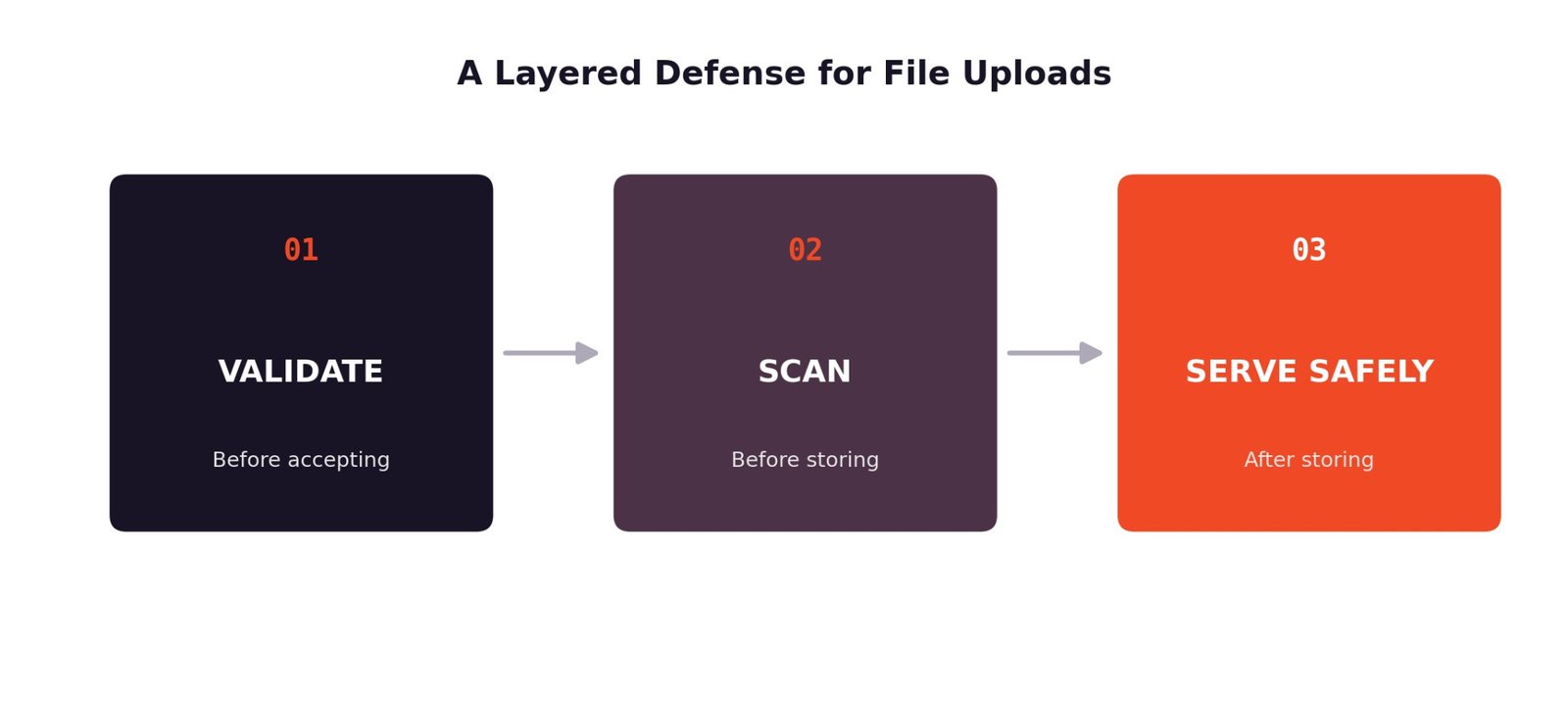
No single check catches all of this, which is why file upload security works best as a sequence of independent stages.
- Validate before accepting: Confirm the file is what it claims to be, and that it fits your size and type constraints, before it is written anywhere.
- Scan before storing: Run malware scanning for uploads as part of the intake process, not as an afterthought once the file already exists in permanent storage.
- Serve safely after storing: Control how a file is delivered back to users so that stored content cannot execute or leak in ways you did not intend.
With the overall shape of the problem in view, it helps to walk through each layer in the order a file actually moves through your system, starting with what happens the moment it arrives.
Validating Uploads
Validation is the first checkpoint, and it is where a surprising number of upload vulnerabilities get through simply because the checks are too shallow.
Type and Size Checks
A file’s extension is a claim, not proof, so validation needs to look past it.
- Server-side type verification: Check the actual file signature or content structure on the server, rather than trusting the extension or the MIME type the browser reports. This is the difference between real file upload validation and a check that only looks convincing.
- Enforced size limits: Set explicit maximum file sizes at the server and, ideally, at the storage layer too. Oversized uploads are a common vector for both denial-of-service attempts and storage abuse.
- Extension and content agreement: Reject files where the declared extension does not match the actual content type detected on the server. A file named pdf that is structurally an executable should never pass this check.
These checks are simple to describe but easy to implement inconsistently across an application. A form that validates uploads on one endpoint but skips the same check on a mobile API or an admin tool creates a gap that undermines the work done everywhere else, so consistency across every intake path matters as much as the checks themselves.
Filename and Metadata
What a file is called, and what it carries beyond its visible content, both need attention before storage.
- Sanitising filenames: Strip or encode characters that could be used for path traversal, and never use a user-supplied filename directly to construct a storage path.
- Stripping dangerous metadata: Many file formats can embed scripts, macros, or tracking data in metadata fields. Removing this during processing closes off a quiet but real attack surface.
- Normalising stored names: Generate a new, predictable filename for storage, such as a hash or UUID, and keep the original name only as display metadata. This alone prevents a wide range of naming-based exploits.
Validation filters out a large share of bad input, but it cannot see inside a file the way a scanner can, which is where the next layer takes over.
Virus and Malware Scanning
Validation confirms a file looks like what it claims to be. Scanning checks whether it is actually safe to keep around.
Scanning in the Pipeline
Where and when scanning happens in the upload flow determines how much protection it actually provides.
- Scan on upload before storage: File upload virus scanning is most effective when it happens before a file is written to permanent storage, not after. A file that never gets written cannot be accessed by anything else in the meantime.
- Quarantine on detection: When a scan flags a file, the correct response is a file quarantine workflow: isolate it, log the event, and reject it from the standard storage path rather than silently deleting or, worse, silently keeping it.
- Sync vs. async scanning trade-offs: Synchronous scanning blocks the upload response until a verdict is ready, which is simpler to reason about but adds latency. Asynchronous scanning accepts the file into a temporary holding area and confirms it later, which keeps uploads fast but requires the file to stay inaccessible until it clears.
The right choice usually depends on how the file is used afterwards. A profile photo that a user expects to see immediately might call for synchronous scanning despite the added wait, while a bulk document upload feeding an internal review process can tolerate an asynchronous check without disrupting the experience.
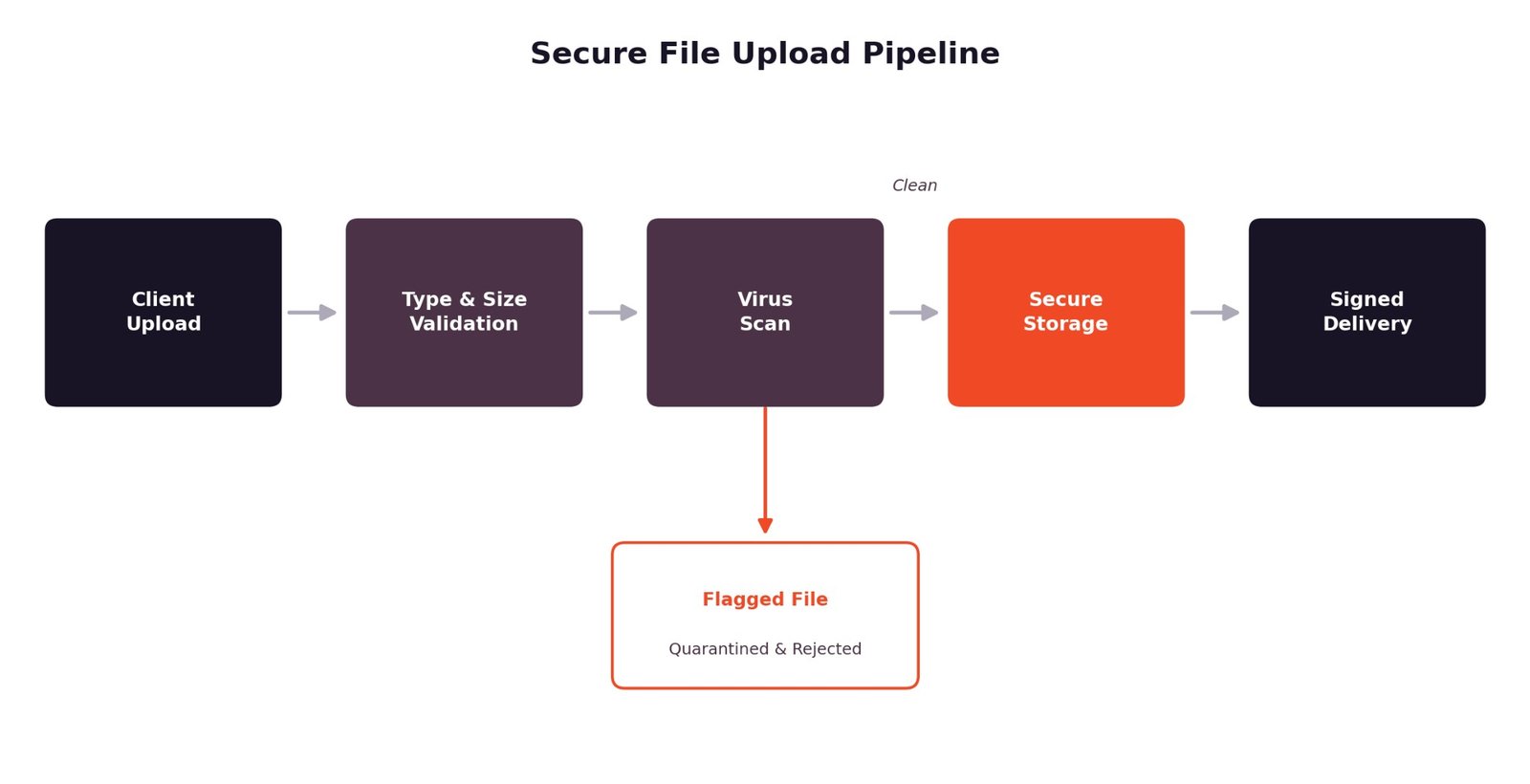
A clean scan result is good news, but it is not the end of the story. Where and how a file is stored still shapes how much risk it carries.
Access Control and Storage
Once a file passes validation and scanning, storage decisions determine how much exposure it creates over its lifetime.
Storing Safely
Secure file storage is less about the storage technology itself and more about the access model wrapped around it.
- Signed, time-limited access URLs: A signed file upload policy or signed access URL means a file is not reachable by anyone who happens to guess or find its path. Access expires, and it can be scoped to a specific action.
- Isolated storage domain: Serving user-uploaded content from a separate domain or subdomain from your main application keeps cookies, sessions, and scripts from that domain out of reach if a malicious file ever executes.
- Encryption in transit and at rest: Uploads should travel over TLS, and stored files should be encrypted at rest, so a storage-level breach does not hand over readable content directly.
Storage is only half of the equation. What happens when that stored file gets requested again matters just as much.
Safe Delivery
A file can pass every upstream check and still cause harm if it is delivered back to users carelessly.
Serving Uploaded Files
Delivery is where a lot of upload security work quietly gets undone, usually through a small misconfiguration.
- Correct content-type handling: Serve files with an explicit, accurate content type rather than letting a browser guess. Incorrect content types are how a browser ends up rendering an uploaded file as executable HTML instead of downloading it as plain data.
- Preventing inline execution: Use headers like Content-Disposition: attachment and a strict Content-Security-Policy where appropriate, so uploaded content cannot run scripts in the context of your application.
- Access-controlled downloads: Pair delivery with the same signed-access model used for storage, so viewing or downloading a file still requires a valid, expiring credential rather than a static public link.
Building and maintaining every layer described above – validation, scanning, storage, and delivery – is a real engineering commitment, which is why many teams look for infrastructure that already handles it.
How a Managed Uploader Enforces This
Rather than building each of these layers independently, some teams choose to build on top of upload infrastructure that already accounts for them.
Security Built In
A managed uploading layer can fold validation, scanning, and access control into the upload flow itself instead of leaving each piece to be assembled and maintained separately.
- Validation and scanning support: File type and size checks along with malware scanning can run as part of the upload process itself, before a file reaches long-term storage.
- Signed policies and access control: Signed upload policies and expiring access URLs handle the storage and delivery side, so files are not exposed through static, guessable links.
- Encrypted, CDN-backed delivery: Files can be served through infrastructure that handles encryption and access control at the delivery layer, not just at rest.
Filestack’s secure file upload feature set is built around this layered model, combining validation, virus scanning, and controlled delivery so teams do not have to stitch every piece together on their own. For teams evaluating whether to build this from scratch or lean on existing infrastructure, it is a useful reference point for what a complete implementation covers.
Secure file upload is not a single feature you switch on. It is the sum of decisions made at every stage a file passes through: what you accept, what you scan for, where you store it, and how you hand it back. Skipping any one layer, whether that is server-side validation, malware scanning, or careful delivery headers, leaves a gap that the others cannot fully cover on their own.
Treat uploads as untrusted input from the first byte to the last, and build or choose infrastructure that reflects that. Whether you assemble validation, scanning, and delivery yourself or lean on a platform that already handles it, the goal is the same: nothing reaches your users or your systems until it has earned that trust.
FAQs
What makes a file upload secure?
A secure file upload combines several independent checks: server-side validation of file type and size, virus and malware scanning before storage, controlled and encrypted storage, and safe delivery that prevents stored files from executing in a browser.
Why is client-side file validation not enough?
Client-side checks run in the user’s browser, which means they can be bypassed entirely by anyone sending requests directly to your server. They improve the user experience by catching obvious mistakes early, but they provide no actual security guarantee.
How should a server verify an uploaded file type?
The server should inspect the actual content or file signature of the upload rather than trusting the file extension or the MIME type reported by the client. This confirms the file is genuinely what it claims to be.
Should uploaded files be stored before virus scanning?
No. Files should be scanned before they are written to permanent, accessible storage. Storing first and scanning later leaves a window where an infected file is already reachable by other parts of the system.
What happens when malware scanning fails or times out?
A well-designed pipeline treats scan failures and timeouts the same way it treats a positive detection: the file is held back or quarantined rather than allowed through by default. Failing open defeats the purpose of scanning in the first place.
How should untrusted uploaded files be delivered safely?
Serve files with accurate content types, use headers that force a download instead of inline rendering when appropriate, and require signed or access-controlled URLs rather than static public links.
How do signed upload policies protect files?
A signed policy attaches an expiring, cryptographically verified permission to a specific upload or download action. This prevents files from being accessed through guessed or leaked URLs and limits how long any single link remains valid.
Join Our Telegram Group

Join Our WhatsApp Group

