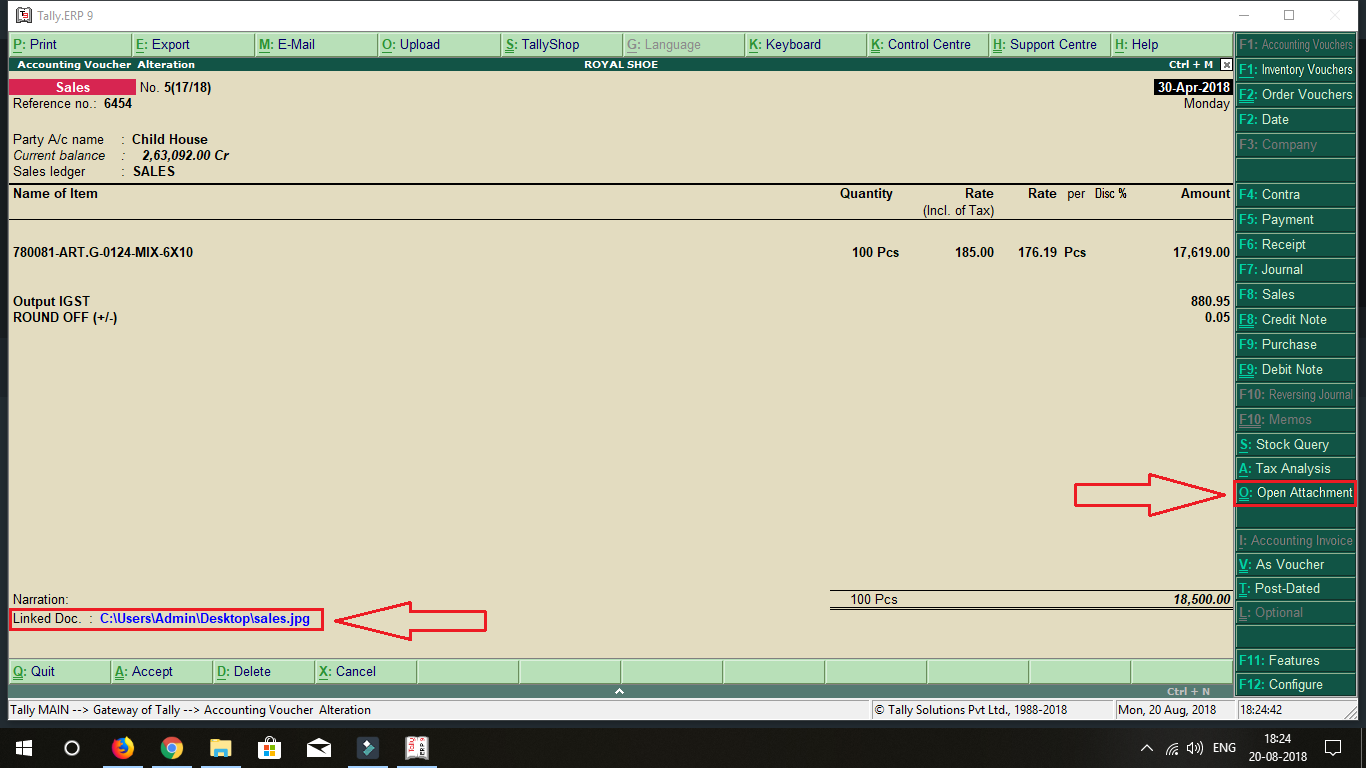
Here is the Preview of this TDL file
How to Install the TDL File in Tally
Step 1. Go to Gateway of Tally.
Step 2. Then Press Ctrl+Alt+T button
Step 3. Now Press F4 Button or Click on “Manage Local TDL” button
Step 4. Now do “Yes” to “Loan TDL Files on Startup” option
Step 5. Now in the next line “List of TDL Files to preload on Startup” Enter the TDL File Path or Location Like “E:\File.tdl”
Step 6. Now save the settings
Your TDL File is ready to use.
Watch this Video to Learn
File Attachment TDL for Tally ERP 9 Download here

Join Our Telegram Group

Join Our WhatsApp Group


Nazim bhai mera file to attavhed ho gaya lekin ope. Nahi ho raha he jais video me he waise hi open kiya lekin attached open nahi ho raha he.
Not Working TCP
Please send attachment file TDL
kindly update tally prime attachment tdl
How much it would cost please
How to edit attached file as once fed it skips the field
ha me mail kar sakta hu plz email add send kare
Could you please post , Email – TDL for attachment various formats, to master.
thanks
pradeep
can you please email TDL for attaching files to in Master (accountsinfo)
thanks
pradeep
I will grateful if you could email me TDL for attaching doc of all formats to Master (ie Master (Accounts Info & Inventory Info)
thanks pradeep
attached file tdl not work plz help
HOW TO EDIT.. OR ATTACH FOR OLD TRANSACTION
no able to attach file . it shows the the location only but no attahcments and also can not open and check the file. FAULTY TDL
YOU HAVE TO GIVE THE EXTENSION OF FILE ALSO LIKE JPEG OR PNG OR PDF JUST LIKE LOGO ATTACHMENT
TDL NOT WORK. IN YOUR VIDEO AFTER PUT PATH OF JPG FILE. YOUR PATH WAS MAKE BLUE COLOUR. LIKE AS HYPERLINK. BUT IN TDL IT IS ONLY SHOW LIKE AS NARRATION.
Hello, I need this attachment TDL, how can i buy/purchase this one.? what may be the cost.?
please send attachement tdl
Great TDL. but the file is unable to download from YouTube.
Request you to send the email for the attachment TDL
Please send the attachment file TDL.
Email ID :- shridarshan_badgujar@rediffmail.com
WILL THIS MAKES TALLY DATA HEAVY TO LOAD
Voucher Type – Purchase
Attachment is not Open.
Please Help how to open Purchase attached file ?