
Hello Dear Readers! today we will learn about the bookmark in tally prime, eventually, we do bookmark in our browser for the faster reach of the website or any important website we often do bookmarks but have you ever thought what if you have the ability to do bookmark in tally prime to reach important links, for example, GST Login, Youtube for Guidance or help? the answer is “yes” with the help of this TDL you can create your own Bookmark in the tally prime so let’s see can we can add this amazing tdl into our tally prime software.
TDL Code For Bookmark in Tally Prime
[#MENU : Gateway of Tally]
title: TechGuruPlus

Add: Key Item : Before : @@locQuit : MyBookmark: O: Menu : Bookmark

[Menu: Bookmark]

Key Item : GST portal :Action:Browse :"https://www.gst.gov.in/"

Key Item : GST Login :Action:Browse :"https://services.gst.gov.in/services/login"

Key Item : GSTSearch :Action:Browse :"https://services.gst.gov.in/services/searchtp"

Key Item : Youtube :Action:Browse :" https://www.youtube.com/TechGuruPlusIndia"
Step 2: After Saving the above code into Notepad now open your Tally Prime ERP software and install the TDL, and if you don’t know to install the tdl file then please follow the below which guide you to upload the tdl file in tally prime
Step 3: Now after loading the above tdl code into tally prime you can see a new option in tally prime as shown in the below image as “My Bookmark”
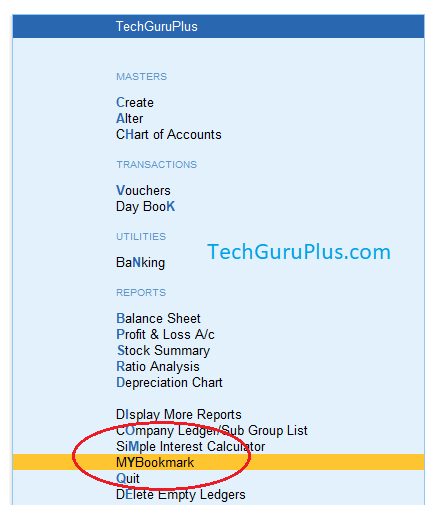
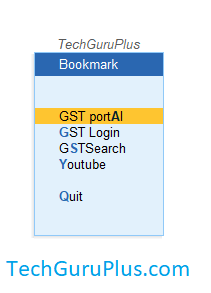
Step 4: just click on the “My Bookmark” option and then you can see a list of quick-access links as we have mentioned in the code and you can also add your own bookmark by adding your own bookmark link by editing the above code.
Thank you, readers! If you liked this article, then share it with your friends on social media, so that they too can get this information
Download Button पर Click करके फ़ाइल डाउनलोड करें
Join Our Telegram Group

Join Our WhatsApp Group

