नमस्कार दोस्तों आज हम एक ऐसे tdl फाइल के बारे में चर्चा करेंगे ,जिसकी मदद से आप अपने Tally Prime में इस TDL कोड के साथ हम इस TDL कोड से हम Authorized Signatory को अपनी कंपनी के नाम और Proprietor Invoice में बदल सकते हैं। तो चलिए देखते हैं कि हम कैसे उपयोग कर सकते हैं इस tdl फ़ाइल का tally prime में ?
TDL Code to Change Authorized Signatory
[#Line : EXPSMP Authourity]
Local : Field : Simple Field : Set as : "Proprietor"

[#Part: EXPINV Signature]
Add: Line :Prop
[Line:Prop]
Left Fields : Simple field
Local : Field : Simple Field : Set as : "For, TechGuruPlus"
Step 2 : अब above code को Save करने के बाद Tally Prime पर TDL File अपलोड करें ( और अगर आपको Tally Prime पर TDL File upload करने का तरीका नहीं पता है तो नीचे दिए गए Link पर Click करें जो आपको Tally Prime पर TDL File अपलोड करने के लिए Guide करेगा )
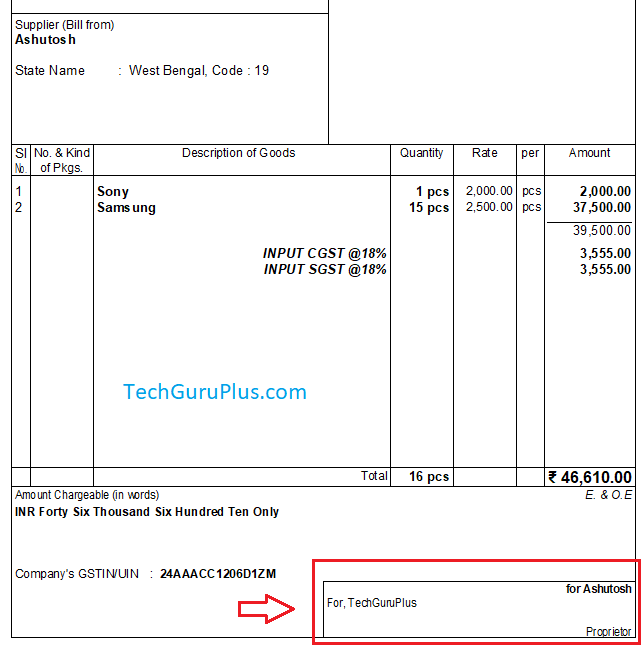
Step 3: Now after Loading the TDL open any Sales voucher Entry and press ALT+P for print option and then go to the “preview” option you will find the “Authorized Signatory” has been changed to your name and Designation as shown below image
धन्यवाद दोस्तों! अगर आपको ये आर्टिक्ल पसंद आया हैं तो इसको सोशल मीडिया पर अपने दोस्तो के साथ जरूर से शेयर कीजिए, जिससे उनको भी ये जानकारी प्राप्त हो सके।
Download Button पर Click करके फ़ाइल डाउनलोड करें
Join Our Telegram Group

Join Our WhatsApp Group


Signature is not print in correct position, when print out the page. Check & correct TDL.